MCGestureControl
Playing Minecraft with my body: a phone camera watches me, and a small neural network turns what it sees into game controls. A prototype that I have put on hold.
What it is
I wanted to play Minecraft without a keyboard. I never got it to the point where it plays the game properly, so this is a project that stopped partway, and I would happily go back to it. The idea is that if I lean left, my character steps left. If I swing an arm, it attacks. A fist and then an open palm lets me look around. A phone on a stand watches me, my PC works out where my shoulders, arms and fingers are in every frame, and a small neural network, which is a program that learns patterns from examples, turns that into the keys and mouse movements I would normally press.
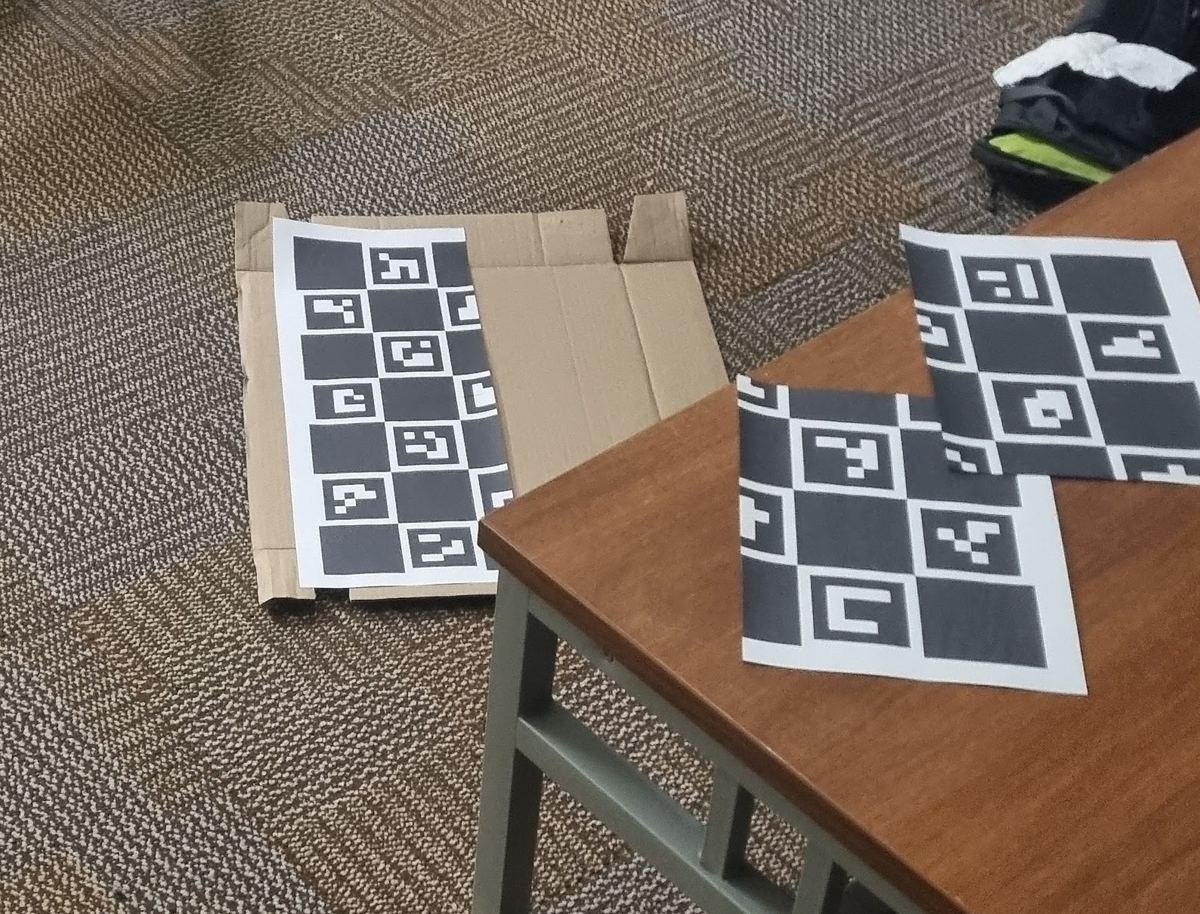
The part that lets another program press keys inside Minecraft is a mod written by Lucas Øyen. The camera app, the code that ties it together and the learning side are mine. The body and hand tracking uses existing models. At one point we printed a few ChArUco boards (a checkerboard with small ArUco markers in the squares) to calibrate the camera against, and then worked out we did not need them (there is a photo of them in the technical version).
How I tried to do it
The first version recognised nine gestures, like walking, jumping and swinging, and each one pressed a fixed key. That falls over quickly. It was too eager to decide I was walking, and it knew nothing about the game, so drawing a bow did the same thing whether I was holding a bow or a pickaxe.
The second version skips the gestures. It looks at my body and also at the game itself, such as what I am holding, my health, whether a monster is close and whether the inventory is open, and it guesses the controls directly. To teach it, I play Minecraft normally while the computer records the screen and the keys I press. Then I watch that video back and act it out in front of the camera, so every moment has both what my body did and which keys were down.
What happened
Not much that works. The small first model I trained was nowhere near good enough to play with. I keep some recordings back that the model never trains on and test it on those, the way you might study from old exam papers and then sit one you have not seen. On that test the best round of training scored 0.48, where 1 is perfect, and the score jumped around from one round to the next instead of climbing steadily.
Part of the reason is what it learned from. It was trained on short clips of single gestures that I turned into key presses, not on real play, so it never saw what a stretch of Minecraft looks like. And it cannot look around at all, because those clips have no looking in them.
The bigger second model is written, but I have not trained it and it is not connected to the live setup. There is no demo of it.
What stopped me was data. Teaching the model to play needs a lot of recorded play with the acting-out pass on top of each session. I recorded some training clips, but nowhere near enough, and the amount still to do put me off.
What's next
It is on hold for now. If I pick it up again, the plan is to record more real play sessions, do the acting-out pass on them, train the bigger model and see whether it beats 0.48. The part I am least sure about is the inventory. Hitting one small slot by pointing with a hand may simply not be precise enough, and I would like to find out.
What I wanted
I wanted to play Minecraft by moving. Lean to strafe, swing an arm to attack, open a palm to look around. A phone on a stand films me, the PC finds my body and hands in every frame, and something turns that into controls.
I never got it to play Minecraft properly. The design needs a lot of paired recordings and I did not have nearly enough, and the amount still to record discouraged me enough that I put it down. I would be glad to revisit it. What follows is what exists and how far it got.
The first version was the obvious one. A small model classified nine gestures (walking, sprinting, crouching, jump, swing, draw bow, place block, throw, sword draw) and a lookup table turned each into a key. Strafing was a rule: how far my shoulders sit to one side of my hips, smoothed and given hysteresis so it does not flicker. Looking was a virtual joystick on the left hand. Make a fist, open the palm, and from then on how far the palm drifts from where it opened turns the camera.
The problems showed up fast. Walking fired too easily at its 0.3 threshold, though I never measured how often, and the lookup table knew nothing about the game, so the bow gesture sent the same key whether I held a bow or a pickaxe. Version 2 throws the table away. The model reads body, hands and game state and predicts the controls directly. In between sat a first policy that already did that for 10 controls with 551 inputs. v2 grows it to 28 controls, widens the game state from 16 numbers to 46, extends the memory of its own last five answers to all 28 controls, and adds heads for the hotbar and the inventory.
The Minecraft side is not mine. Lucas Øyen wrote MCCTP, the Fabric mod that lets a program read the game and press keys over a WebSocket, and later MCSTP, which reports the richer state: hostiles nearby, what is in hand, whether a screen is open, and a cursor and clicks for inventory screens. I had bolted some state fields onto MCCTP myself before he split them out into MCSTP, and when he did, he updated my client to match. The client, the models and the training code are mine. I started in February 2026.
How it works
The phone streams camera frames to the PC, and the PC does all the tracking. MediaPipe Pose gives 33 body landmarks in metres, centred on the hips. WiLoR-mini gives 21 3D points on each hand.
What are MediaPipe and WiLoR?
Both are ready-made models that find points on a person in a picture. MediaPipe Pose finds the body, WiLoR-mini finds the hands in 3D. I use them as they come and do not train them. That is why the policy only has to learn from a few hundred numbers per frame, not from raw camera pixels.
We also printed a few ChArUco boards (a checkerboard with small ArUco markers in the squares) to calibrate the camera against. It turned out we did not need them. The only calibration the client does is let the phone's exposure, focus and white balance settle at start-up and then lock them.
1. Phone and client. The phone streams camera frames and stream_client.py on the PC picks them up. All the heavy work happens on the PC.
The seven stages in words
1. Phone and client. The phone streams camera frames and stream_client.py on the PC picks them up. All the heavy work happens on the PC. 2. Tracking. PoseTracker runs MediaPipe for 33 body landmarks in metres. HandTracker runs WiLoR-mini for 21 3D points on each hand. 3. Features. One row of 671 numbers: pose and hands, how fast each point moved since the last frame, 46 numbers from the game, and the model's own last five answers. 4. Transformer. It reads the last 30 rows, about one second at 30 fps, and weights the recent ones more than the old ones. 5. Heads and clean-up. Five heads give 28 outputs. Outside the model, per-control thresholds, smoothing and a look deadzone turn them into clean presses and a steady camera. 6. Bridge. ControlBridgeV2 holds a key while a control stays on and fires a one-off for things like jump, then sends it all over a WebSocket on port 8765. 7. Minecraft. Lucas's mods carry out the controls and report the game state back every tick. That state is the 46 numbers in stage 3.
Each frame becomes one row of 671 numbers: 260 for pose and hands, 225 for how each of those points moved since the last frame, 46 about the game, and 140 for the model's own last five answers. That last block lets it know what it was already doing. While training, those past answers come from the real labels, with 30 percent of them dropped so it cannot lean on them too hard. Live, they are its own previous outputs.
The 46 game numbers are what gives the model context: the item in my hand, health and hunger, whether I am in water or on fire, what the crosshair is on, how far the nearest hostile is and in which direction, whether a screen is open.
The model is a transformer encoder with 6 layers, 8 heads and a width of 256, about 3.5 million parameters. It reads the last 30 rows and pools them with extra weight on the most recent ones.
What does a transformer do with 30 frames?
A transformer lets every item in a sequence look at every other item and decide which ones matter. Here the items are 30 consecutive frames, about a second. That window is how it can tell an arm that is mid-swing from one that is resting, which no single frame can show. The final pooling favours the latest frames, because they decide what to press now.
Five small heads read the pooled result. Action has 12 on/off controls: forward, back, strafe left and right, sprint, sneak, jump, attack, use item, drop, swap hands and open inventory. Look has 2, Hotbar 9, Cursor 2 and InvClick 3, so 28 outputs in all. Which heads count depends on the game. With a screen open only the cursor and the clicks do; otherwise it is action, look and hotbar. The training loss is masked the same way, so the cursor head only learns from frames where an inventory was open.
| Classifier | Policy v1 | Policy v2 | |
|---|---|---|---|
| Inputs per frame | 485 | 551 | 671 |
| Outputs | 9 | 10 | 28 |
| d_model | 128 | 192 | 256 |
| Layers | 3 | 4 | 6 |
Where the training data comes from
With a keyboard in my hands, I cannot also play with my body. So the data is made in two passes. In the first I play normally and gameplay_recorder.py records the screen at 30 fps along with what the game says I am doing each tick: movement, look, hotbar, inventory cursor and clicks. It reads the game's own resolved inputs, not the keyboard, so key bindings and mouse sensitivity do not matter. In the second pass gameplay_playback.py plays that video back while I act it out in front of the phone, and the camera logs my pose against each video frame. Every frame now has a body and the keys that were really down.
What is behavioural cloning?
Instead of telling the model what a good move is, you show it examples and it learns to copy them. An example here is one moment: my body and the game state on one side, the keys that were down on the other. It is the simplest way to teach a controller, and it can only be as good as the examples, mistakes included.
The first policy never went through this. Its labels were converted from my earlier single-gesture clips: a walking clip became "forward held", a swing became "attack" at the moment the hand moves fastest, and sword draw was skipped because it needs game context. I have also recorded nine real play sessions on 22 February, about 55 minutes in total. One recording is corrupted, so eight are usable. That is far too little for v2, and how much more it would take is what stopped me.
What the numbers say
Only the first policy has numbers. It has 551 inputs, 10 controls, a width of 192 and 4 layers, and it learned from those converted clips, not from real play. v2 has no training run yet. The validation set is small: idle accuracy only moves in steps of 1/387, so there are 387 idle windows in it.
| Measure | Epoch 20 | Range over 45 epochs |
|---|---|---|
| Combined score | 0.737 | 0.30 to 0.74 |
| Average F1, 8 on/off controls | 0.48 | 0.19 to 0.48 |
| Idle accuracy | 0.992 | 0.00 to 0.997 |
| Validation loss | 1.00 | 0.20 to 8.55 |
What are F1 and idle accuracy?
For a control like jump, F1 balances two mistakes: pressing it when I did not mean to, and missing it when I did. 1 is perfect and 0 is useless, and I average it over the eight on/off controls. Idle accuracy is how often the model correctly pressed nothing while I was doing nothing. It is easy to score high on that by never pressing anything, so it only means something next to F1.
Tuning a threshold for each control lifts that to 0.52. Without it, the best epoch scored 0.479, so 0.48 is the number I quote.
Average F1 peaked at 0.48 on validation, at its best epoch and before threshold tuning. That is a prototype result, not a working controller.
What didn't work
Validation loss never settled. It was 0.20 at epoch 7 and above 8 by epoch 36, while training loss fell to 0.017. F1 swung between 0.19 and 0.48 and was best at epoch 20. Picking the best of 45 epochs on that same small validation set also flatters the score, so 0.48 is on the optimistic side. Drag the slider above from epoch 20 to epoch 36 and the validation loss goes from 1 to 8 while the training loss only creeps down.
Four controls (strafe left, strafe right, jump and attack) hit the maximum positive weight of 50 in the loss, which means their positive examples are rare. There is no per-control F1 for this run, so I don't know whether the model learned any of them.
The look error looks excellent and means nothing. Validation look error is 6.7e-6 at epoch 20 and about 8e-8 by the end, but the converted clips have no looking in them, so the target was always zero and the easiest way to score well is to output nothing. Only the real play sessions carry look data.
The inventory and hotbar heads in v2 have no results at all. I doubt a body pose can hit one inventory slot precisely, and I have not tested it.
What is unfinished
The project is on hold, and nearly everything below is still open. Train v2 on enough real sessions, after doing the acting-out pass on them, and report numbers per head. Hook ControlPolicyV2 and ControlBridgeV2 into the live client. Measure latency. I have not measured it, and hand tracking may be too slow for 30 fps. Record a demo. And find out whether the inventory part can work at all.
- Stack
- Python, PyTorch, MediaPipe Pose, WiLoR-mini, Android camera app; Java Fabric mods by Lucas Øyen
- Model
- ControlTransformerV2: 30-frame window, 671 inputs, 28 controls, ~3.5M parameters
- Status
- Prototype, on hold. It has never played Minecraft properly: I recorded some training clips but not enough. The first 10-control policy is trained (validation F1 0.48 at its best epoch; 0.52 after tuning a threshold for each control). v2 is written, not trained and not connected to the live client.
- Code
- github.com/Forkei/MCGestureControl, phone app github.com/Forkei/GestureCam